
Automated abstract & session sync from OpenWater
Swapcard + OpenWater Integration
Connect OpenWater with Swapcard to sync sessions, accepted abstracts, and applicant data directly into your events. Eliminate manual session building.



Why Integrate Swapcard with OpenWater?
Swapcard is an event management platform built to manage engagement, AI-powered matchmaking, exhibitor lead capture, and networking. OpenWater is the abstract management platform for professional associations and academic conferences to collect, review, and manage session proposals, paper abstracts, and applications. When integrated, they eliminate the manual work of maintaining two separate systems and ensure every session and applicant profile in Swapcard reflects your authoritative OpenWater data:
- No more manual session building. Skip the copy-paste workflow that costs hours rebuilding accepted sessions. Session data flows directly from OpenWater into Swapcard.
- Keep data accurate. Swapcard pulls from your OpenWater database directly, so sessions and applicant profiles always reflect the latest accepted abstracts and application information from your source of truth.
- Give presenters a head start. Applicant profiles are imported from OpenWater, so participants can engage with the platform before the event begins.
- Stay consistent across events. One OpenWater connection works across your full event portfolio, so you don't re-export or re-upload for every edition.
What the Integration Enables
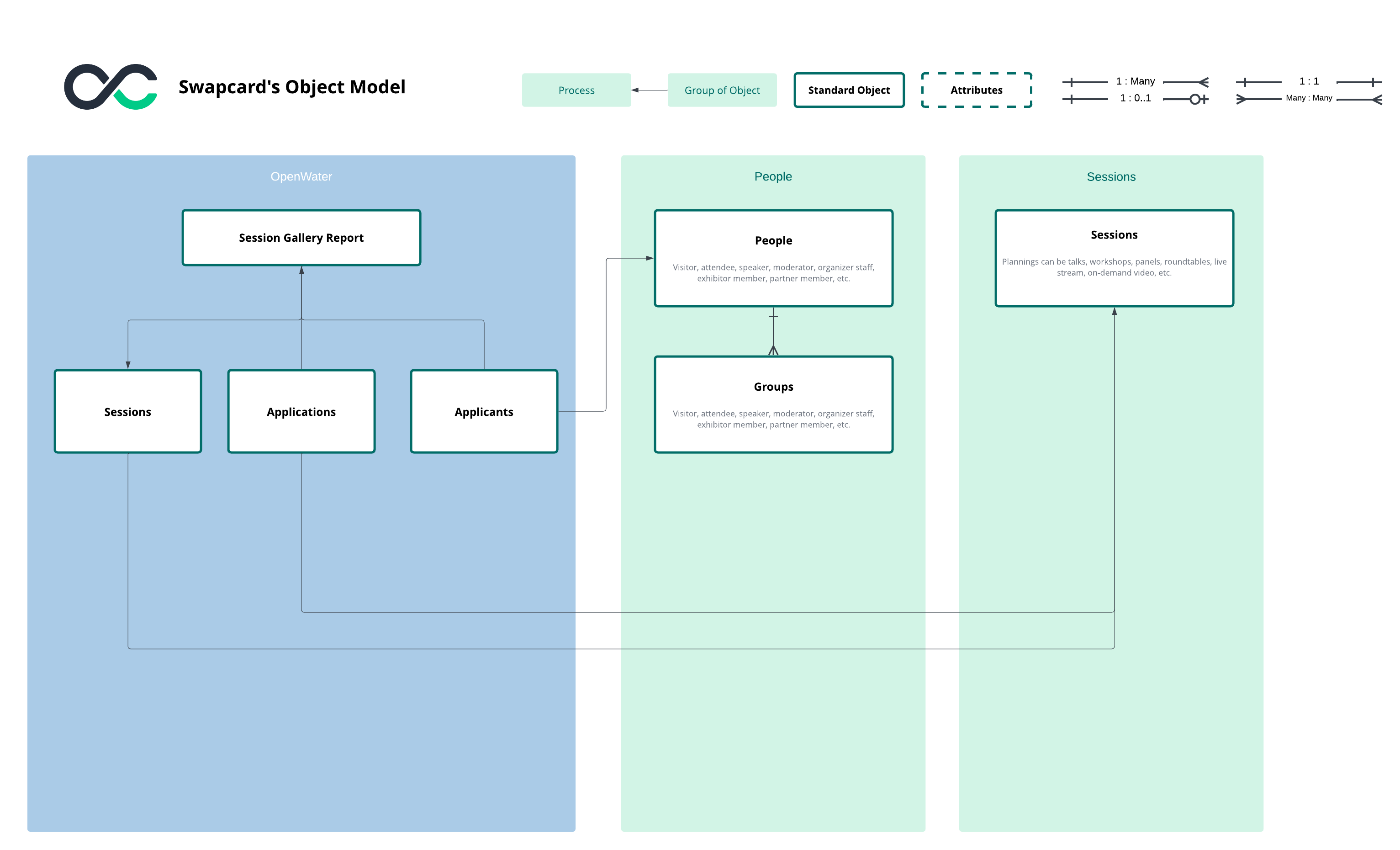
- Automatic session sync – Import scheduled sessions directly from your OpenWater program into Swapcard, including session name, type, start time, end time, room name, and day.
- Automatic application sync – Import accepted abstract submissions assigned to sessions, including application name, category, timing, and parent session details.
- Automatic applicant sync – Import OpenWater applicants as Swapcard attendees, including email, first name, and last name.
- Flexible field mapping – Map any OpenWater field (standard or custom) to Swapcard session or attendee fields. OpenWater custom fields from your form templates are automatically discovered and available for mapping.
- Custom field support – Dynamic fields from your Session Form Template, Submission Form Template, and User Profile Form Template are automatically available for mapping to Swapcard custom fields.
- Pre-populated applicant profiles – Applicants arrive at your event with profiles already built from OpenWater data, ready to connect without additional data entry.
How It Works
- Connect OpenWater to Swapcard. In Swapcard Studio, navigate to Event Builder → Integrations, select "OpenWater." Provide your OpenWater credentials: Domain (your OpenWater instance, e.g., your-organization.secure-platform.com) and API Key (supplied by OpenWater). Enter the Program ID of the OpenWater program you want to sync. Swapcard validates the connection instantly.
- Map your fields. Choose which OpenWater fields map to Swapcard fields. Standard fields (session name, applicant email, start time) and custom fields from your OpenWater form templates are automatically available for mapping.
- Run your sync. Trigger the sync, and your OpenWater sessions, applications, and applicants will populate Swapcard with fully enriched profiles. Re-run at any time to pull updated abstract and applicant data from OpenWater.
Use Cases & Benefits
Why Event Organizers Love OpenWater Integration with Swapcard
- Eliminates manual session building – No more copying accepted abstracts from OpenWater into Swapcard session by session. Sessions and applicants are synced in bulk.
- Accurate data, every time – Swapcard pulls directly from your OpenWater program, so version control issues and data entry errors become a thing of the past.
- Presenters ready to engage from day one – Applicant profiles pre-populated from OpenWater (name, email, profile data) mean presenters can start networking the moment they open the Swapcard app.
- Custom field flexibility – Map OpenWater custom fields from your form templates (Session Form, Submission Form, User Profile) to Swapcard custom fields for complete control over how abstract data appears in your event.
- Scales across your event portfolio – One integration, consistent applicant and session data, across every event you run.
Frequently asked questions about the OpenWater and Swapcard integration
What does the integration between OpenWater and Swapcard manage?
.svg)
.svg)
OpenWater manages abstract submission, peer review, and application workflows as your conference's call for papers system. Swapcard powers session delivery, engagement, networking, and participant amplification through its branded web and mobile app. This integration automatically imports session data, accepted applications, and applicant profiles from your OpenWater program into Swapcard as event sessions and participants. It syncs standard fields (session name, start time, applicant email, first name, last name) plus any custom fields you configure in your OpenWater form templates (Session Form Template, Submission Form Template, User Profile Form Template). Learn more about setting up the OpenWater integration.
Do I need an OpenWater account to use this integration?
Yes. Swapcard and OpenWater are separate platforms. You'll need an active OpenWater account with API access and a configured Program (solicitation) with sessions published to the Session Gallery to connect the two systems.
Do I need technical expertise to set up the OpenWater integration?
No. You will need your OpenWater credentials (Domain and API Key supplied by OpenWater) and the Program ID for the program you want to sync. Swapcard's interface guides you through OpenWater authentication, field mapping, and activation—no coding or IT support needed.
How often does the OpenWater integration sync data?
The integration uses full-refresh sync, meaning that every sync fetches a complete, up-to-date session, application, and applicant list from your OpenWater program. You control when syncs run, so your Swapcard session list always reflects the latest data from your OpenWater program. Note that deletions are not captured automatically—if a session or applicant is removed from OpenWater, you'll need to manually delete the corresponding record in Swapcard to keep both systems aligned.
Can I map OpenWater custom fields to custom fields in Swapcard?
Yes. OpenWater custom fields from your form templates (Session Form Template, Submission Form Template, User Profile Form Template) are automatically discovered and available for mapping. You have complete flexibility to map any OpenWater custom field to Swapcard's standard fields or your own custom fields, giving you full control over how abstract and applicant data populates your event.

Easily integrate & unify your data
Seamlessly connect your essential event tools and unlock the power of unified data to make data-driven decisions that enhance event success and foster long-term growth.

“Swapcard helped us with the integration of data across our different business units...has helped my team save 2 weeks of work per event.”

Patrick Shields
Director of Customer Success, Informa Tech
Schedule live demo
By submitting this form, you agree to receive periodic emails on insightful content related to events and our product, and in accordance with our Privacy Policy. You can, of course, change your preferences or unsubscribe at any time.

.svg)


.svg)
.svg)
.svg)
.svg)


