
Exhibitor management & interactive floor plans made simple
Swapcard + Map Your Show Integration
Bring your exhibitor management, floor plan, and event engagement together in a unified experience that empowers organizers, simplifies exhibitor management, and makes navigation easier for attendees, on any device. Connect Map Your Show (MYS) with Swapcard to automatically import exhibitors and contacts, and embed your live floor plan directly inside Swapcard’s industry-leading web and mobile app.
.webp)


Why Integrate Swapcard with Map Your Show?
Swapcard is a comprehensive event engagement platform for attendee registration, ticketing, AI-powered matchmaking, exhibitor management, sponsorship packages, and analytics. Map Your Show powers exhibitor management and interactive floor plans for leading trade shows and conferences. When integrated, they deliver a superior and unified in-app experience with enhanced navigation for attendees and exhibitors:
- Improve attendee engagement. Combine Map Your Show’s floor plan with Swapcard’s networking, session planning, and matchmaking features to help attendees navigate the venue and connect with the right exhibitors.
- Automated exhibitor import & contact sync. Instantly import exhibitor information, including company name, booth number, logo, description, social links, and contact details, from Map Your Show into Swapcard. Contacts are automatically linked to their company profiles for accurate relationship management.
- Interactive floor plan experience. Attendees can explore a searchable, mobile-friendly venue map directly within Swapcard to find booths, stages, and amenities, which are updated in real-time from Map Your Show.
- Exhibitor control and visibility. Exhibitors can manage their profiles, showcase products, and track leads—all connected to their booth location for improved visibility.
- Smarter event operations. Centralize your exhibitor data and floor plans to eliminate the need for spreadsheets and manual updates, saving time, reducing errors, and delivering a seamless experience for all stakeholders.
.png)
What the Integration Enables
- Comprehensive exhibitor visibility – Automatically showcase exhibitor profiles with logos, booth locations, product categories, and descriptions—sourced from Map Your Show and displayed in Swapcard.
- Targeted exhibitor import – Choose which exhibitors to import based on package, type, or any custom field in Map Your Show, ensuring only the most relevant profiles appear in your event.
- Error handling & sync control – Sync issues are flagged for easy troubleshooting. You decide when to initiate syncs, giving you full control over your data.
- Scalable for any event size – Whether you are running a small exhibition or a large-scale trade show, the integration handles thousands of profiles and contacts with ease.
- Multi-level & searchable navigation – Attendees can search by booth number, exhibitor name, or category and navigate across multiple halls or floors.
- Wayfinding support – Optional features, such as “You are here” markers and blue-dot navigation, help attendees orient themselves in large venues.
- Branded, customizable maps – Match the map to your event’s visual identity by customizing icons, colors, and labels directly in Map Your Show before embedding it in Swapcard.
- Accessible on any device – Attendees can access and interact with the map on desktop and mobile—even offline if needed.
How It Works
- Connect your accounts. In Swapcard Studio, go to Event Builder → Integrations → Map Your Show, then enter your credentials and client ID.
- Select and link your event. Choose the specific Map Your Show event you want to connect to your Swapcard event.
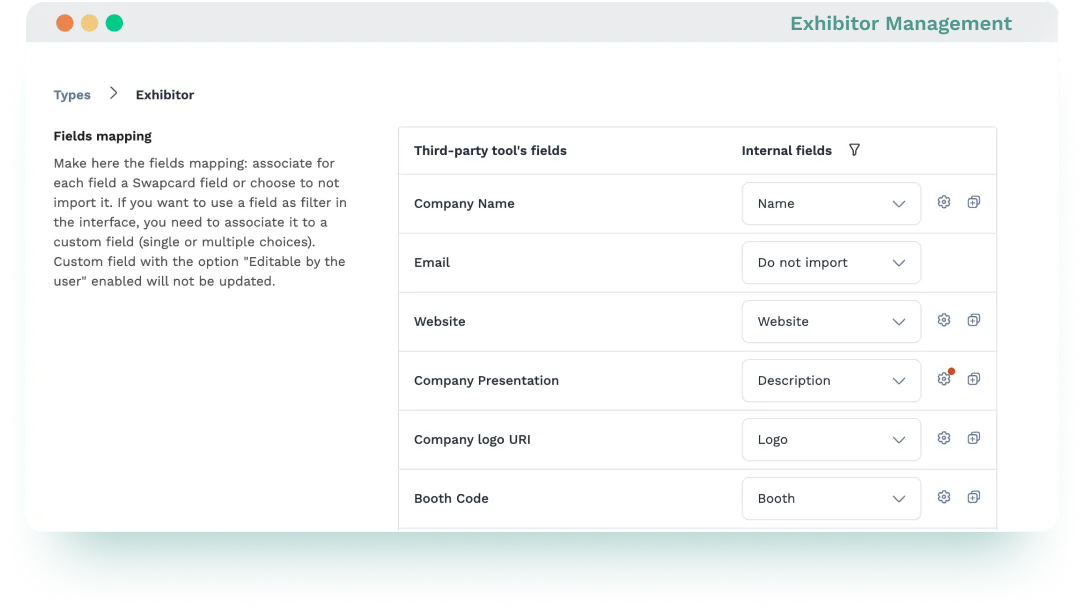
- Configure your sync. Select which data streams to import (e.g., exhibitors and contacts), and map fields like company name, booth number, or category to their correct locations in Swapcard.
- Start synchronization. Click ‘’Run Integration’’ to start syncing. Data will begin importing and continue updating automatically every 60 minutes.
- Set up the floor plan. Design your venue layout in Map Your Show’s Floor Builder with booths, stages, and amenities.
- Add your floor plan. In Swapcard Studio, go to Event Builder → Pages & Menu, create a Floor Plan page, and paste your MYS map link. Customize the title, colors, and layout to match your event branding.
- Publish & go live. Once published, attendees can explore the interactive floor plan and exhibitor list directly within Swapcard’s web and mobile app. They can search, zoom, and navigate across floors in real time.
Use Cases & Benefits
Why Organizers Love MYS Integration with Swapcard
- Fast setup – Activate the integration in minutes, whether importing exhibitor data or embedding your floor plan, using Swapcard Studio. No technical expertise required.
- Accurate & real-time data sync – Keep exhibitor profiles, contact details, and booth assignments up to date across platforms, reducing errors and eliminating outdated information.
- Streamlined workflows – Eliminate manual CSV uploads and double data entry. Sync once from Map Your Show and let automation handle the rest.
- Unified platform experience – Manage registration, exhibitor profiles, floor plans, networking, and analytics in one centralized platform.
- Improve attendee experience – Offer mobile‑friendly, interactive maps inside Swapcard alongside session schedules and exhibitor listings, helping attendees navigate and engage more easily.
- More time for revenue-driving tasks – Allow your team to focus on sponsorship sales, lead capture, and exhibitor success instead of manual admin work.
- Enhance exhibitor value – Exhibitors appear in Swapcard sooner, helping them engage earlier, generate more leads, and maximize their event presence.
Frequently asked questions about the Map Your Show and Swapcard integration
What does the integration between Map Your Show and Swapcard manage?
.svg)
.svg)
Map Your Show supplies exhibitor data, contact records, and the interactive floor plan. Swapcard handles registration, ticketing, exhibitor profiles, lead capture, sponsorship sales, session agendas, networking, and analytics—using data synced from MYS.
Can floor plan data be displayed in Swapcard?
Yes. You can embed interactive floor plans directly into both the web and mobile app views.
Do I need technical expertise or custom development to enable the integration?
No. The integration is native to Swapcard and requires no coding. Swapcard offers a pre-built connector for MYS integration. Simply connect your Map Your Show account in Swapcard Studio, select your event, configure sync settings for exhibitors and contacts, and paste your floor plan link into the Event Builder.
Can the integration handle multiple exhibitor packages?
You can configure the integration to import exhibitors in different groups based on package, type, or any custom field in Map Your Show.
How often does the Map Your Show integration sync data with Swapcard?
Once activated, the integration syncs exhibitor data automatically every 60 minutes. This means booth assignments, company profiles, contact details, and any updates made in Map Your Show are reflected in Swapcard without any manual action. You can also trigger a sync manually at any time from Swapcard Studio to pull the latest changes on demand.

Easily integrate & unify your data
Seamlessly connect your essential event tools and unlock the power of unified data to make data-driven decisions that enhance event success and foster long-term growth.

“Swapcard helped us with the integration of data across our different business units...has helped my team save 2 weeks of work per event.”

Patrick Shields
Director of Customer Success, Informa Tech
Schedule live demo
By submitting this form, you agree to receive periodic emails on insightful content related to events and our product, and in accordance with our Privacy Policy. You can, of course, change your preferences or unsubscribe at any time.

.svg)


.svg)
.svg)
.svg)
.svg)


