
Accurate exhibitor & booth sync
Swapcard + A2Z Events Integration
Sync company and online booth data from A2Z Events by Personify into Swapcard to keep your exhibitor directory and floor plan accurate and consistent across Swapcard’s web and mobile app.
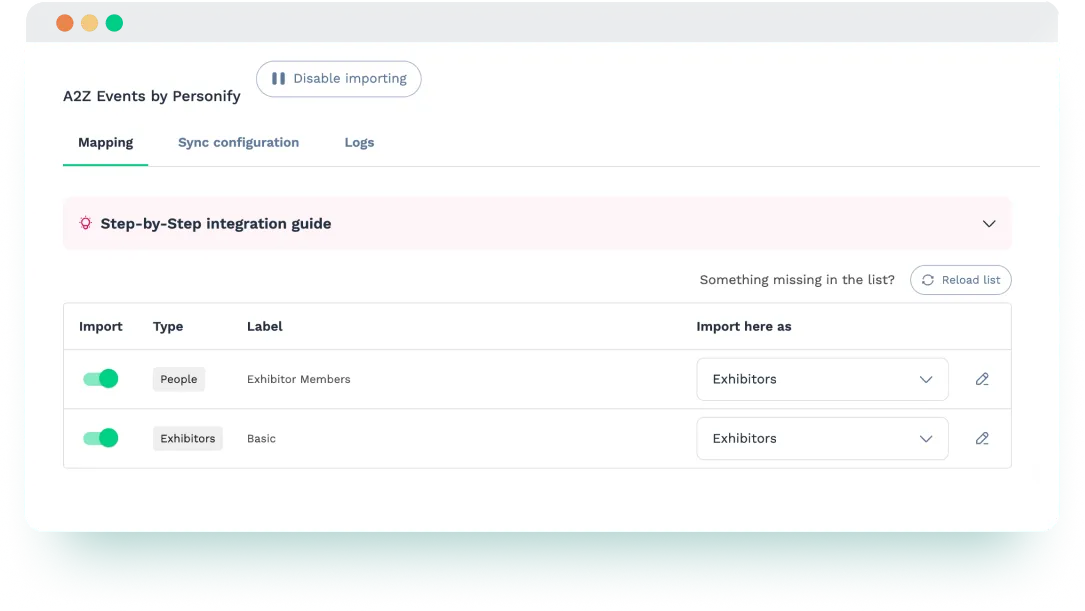


Why Integrate Swapcard with A2Z Events?
Swapcard is an event platform designed to drive engagement, maximize ROI, and increase revenue with AI-powered tools. A2Z Events by Personify is a trusted solution for managing exhibitor data and online booths. When integrated, they create a reliable flow of exhibitor content into Swapcard, allowing organizers to:
- Eliminate manual imports. Automatically sync exhibitor lists and booth assignments from A2Z Events into Swapcard, without spreadsheets or manual uploads.
- Ensure data accuracy. Keep exhibitor names, logos, descriptions, and booth numbers consistent across Swapcard’s web and mobile app.
- Streamlining operations. Avoid duplicate data entry and reduce admin time by centralizing exhibitor management.
- Accelerate exhibitor setup. Get exhibitor listings ready faster for networking, lead capture, and booth discovery.
- Boost exhibitor visibility. Display accurate booth locations and searchable company profiles in Swapcard’s interactive map and exhibitor directory.
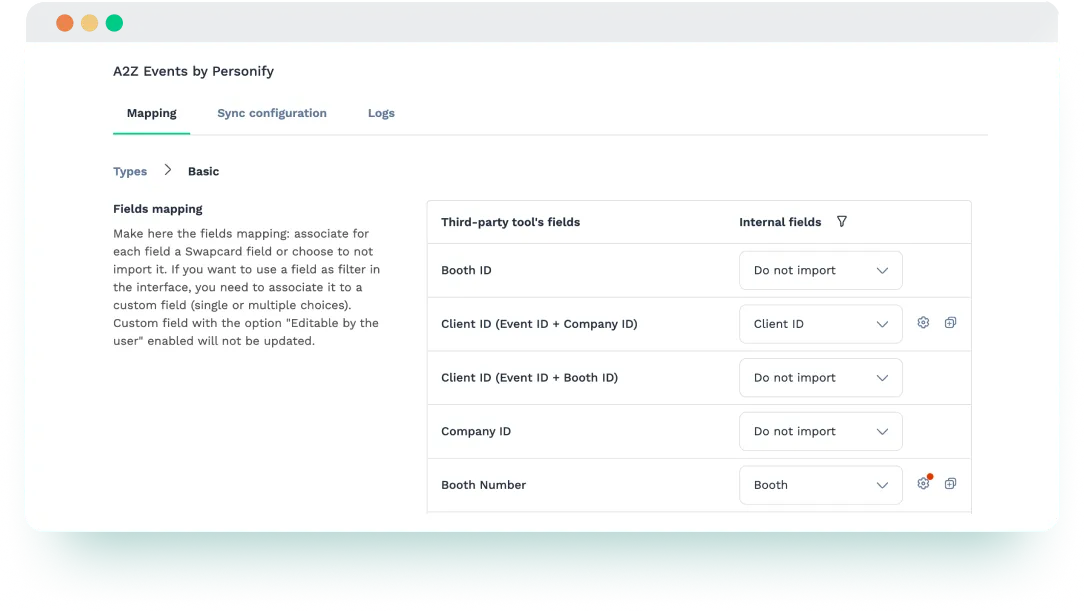
What the Integration Enables
- Exhibitor data import – Automatically pull company information from A2Z Events into Swapcard, including names, logos, descriptions, booth numbers, and contacts.
- Online booth synchronization – Keep booth numbers and locations aligned so exhibitors are correctly displayed in Swapcard’s map and directory.
- Contact sync – Import exhibitor-assigned contacts to ensure the right representatives appear attached to each company profile.
- Field mapping customization – Map A2Z Events fields to Swapcard attributes for better data alignment.
- Continuous data syncing – Automatic syncs run every hour to reflect the latest exhibitor and booth updates from A2Z Events into Swapcard.
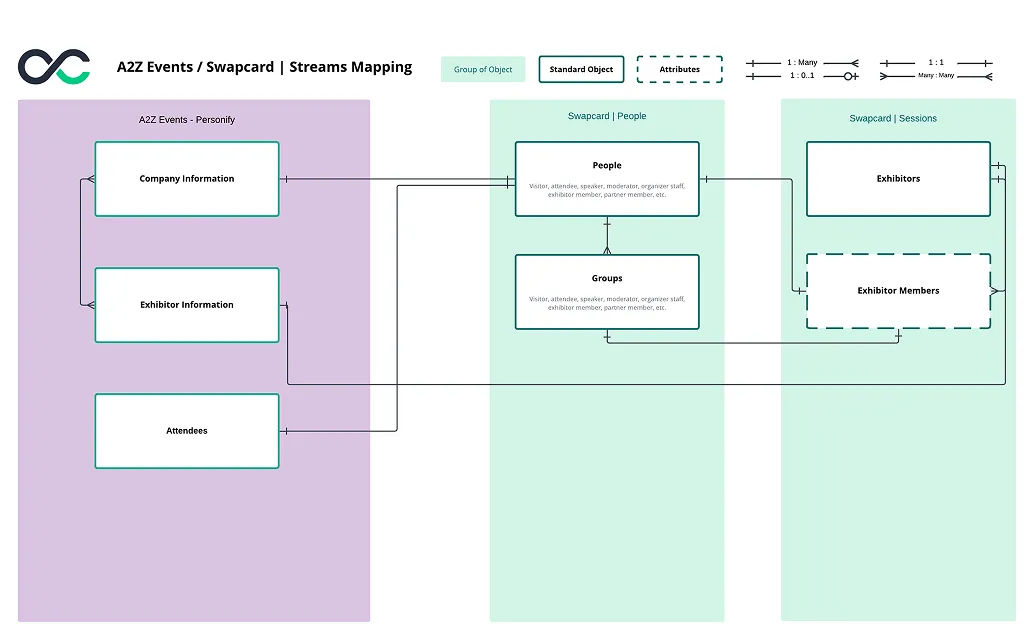
How It Works
- Prepare your A2Z Events credentials. Make sure you have your Event ID and API key from A2Z Events.
- Connect A2Z Events to Swapcard. In Swapcard Studio → Event Builder → Integrations, select ‘’A2Z Events’’ and enter your credentials.
- Select your event and map fields. Choose the A2Z Events event to sync and map company, contact, and booth fields.
- Run the sync. Launch the integration to import exhibitor and booth data into your Swapcard event.
Use Cases & Benefits
Why Event Organizers Love A2Z Events Integration with Swapcard
- Time-saving setup – Eliminate spreadsheets by automatically syncing exhibitor listings and booth details.
- Reliable data – Ensure consistent exhibitor information with structured imports.
- Effortless mapping – Link booth numbers and locations to company profiles without manual work.
- Easy updates – Run syncs anytime to instantly reflect the latest changes from A2Z Events in Swapcard.
- Better attendee experience – Showcase a searchable exhibitor directory and booth maps in Swapcard.
Frequently asked questions about the A2Z Events and Swapcard integration
What does the integration between A2Z Events and Swapcard manage?
.svg)
.svg)
A2Z Events supplies exhibitor data and booth assignments. Swapcard is an event engagement platform for registration, ticketing, exhibitor management, lead capture, sponsorship sales, session agendas, networking, and analytics. This integration imports company profiles, booth numbers, and exhibitor‑assigned contacts from A2Z Events into Swapcard, ensuring your exhibitor directory and booth layout are accurate, consistent, and ready for attendee discovery across Swapcard’s web and mobile app.
Do I need a separate A2Z Events account to use this integration?
Yes. A2Z Events and Swapcard are separate platforms. You must have an active A2Z Events account and valid integration credentials (Event ID and API key).
What exhibitor data is imported into Swapcard?
The sync includes company name, logo, description, booth number, and exhibitor-assigned contacts.
Does the integration sync exhibitors automatically?
Yes. Once configured and started, the integration pulls exhibitor data directly into Swapcard. You control when the sync runs by triggering it manually whenever updates are needed.
Does the integration support custom field mapping?
Not currently. The integration imports standard exhibitor data fields as defined by A2Z Events.

Easily integrate & unify your data
Seamlessly connect your essential event tools and unlock the power of unified data to make data-driven decisions that enhance event success and foster long-term growth.

“Swapcard helped us with the integration of data across our different business units...has helped my team save 2 weeks of work per event.”

Patrick Shields
Director of Customer Success, Informa Tech
Schedule live demo
By submitting this form, you agree to receive periodic emails on insightful content related to events and our product, and in accordance with our Privacy Policy. You can, of course, change your preferences or unsubscribe at any time.

.svg)


.svg)
.svg)
.svg)
.svg)


