
Navigate every venue, effortlessly.
Swapcard + MapsPeople Integration
Large venues lose attendees. Long walks, missed sessions, and wrong turns erode the experience you worked months to build. The MapsPeople (MapsIndoors) integration adds a fully interactive indoor floor plan directly inside the Swapcard web, iOS, and Android apps — so every attendee knows exactly where to go, from the moment they arrive.



Why connect MapsPeople with Swapcard?
Printed maps become outdated before the first session starts. Signage only works if attendees are already heading in the right direction. MapsPeople brings real-time, interactive indoor navigation into the same app your attendees already use for their schedule, meetings, and connections — with zero additional downloads required.
- Eliminate navigation friction — attendees find any session or meeting location with a single tap
- Keep everyone inside one app — no separate navigation tool, no redirect to an external platform
- Surface wayfinding at the right moment — "See on map" appears directly on each session and meeting detail page
- Give exhibitors a new engagement channel — geofencing notifications reach attendees the moment they pass a booth
- Turn foot traffic into data — heatmap insights from Indoor Positioning partners reveal how attendees move through your venue
What the integration enables
Sessions linked to the map
Every session detail page includes a "See on map" button. One tap takes the attendee directly to that session's location on the interactive floor plan — no searching, no scrolling.
Meeting locations on the map
When a meeting location is assigned, attendees can tap to open the floor plan at the correct location — directly from the meeting detail page, or when creating the meeting itself.
Interactive floor plan inside the Swapcard app
The MapsIndoors floor plan is embedded natively across web, iOS, and Android. Organizers configure default zoom level (1–21) and map orientation directly from Event Builder — no developer support required for setup.
Indoor Positioning (optional add-on)
Show a live location indicator on the map via Crowd Connected or IndoorAtlas. Attendees see where they are at all times, and organizers gain access to heatmap data that reveals traffic patterns across the venue.
Geofencing notifications (optional, via Crowd Connected or IndoorAtlas)
Exhibitors can send targeted push notifications to attendees who enter a geofenced area near their booth — a proximity-triggered engagement tool that no printed map can replicate.
Audience access controls
Restrict the floor plan page to specific attendee groups. VIP-only areas, restricted zones, and back-of-house access are all manageable from within Swapcard.
How it works
Step 1: Configure the floor plan in Event Builder
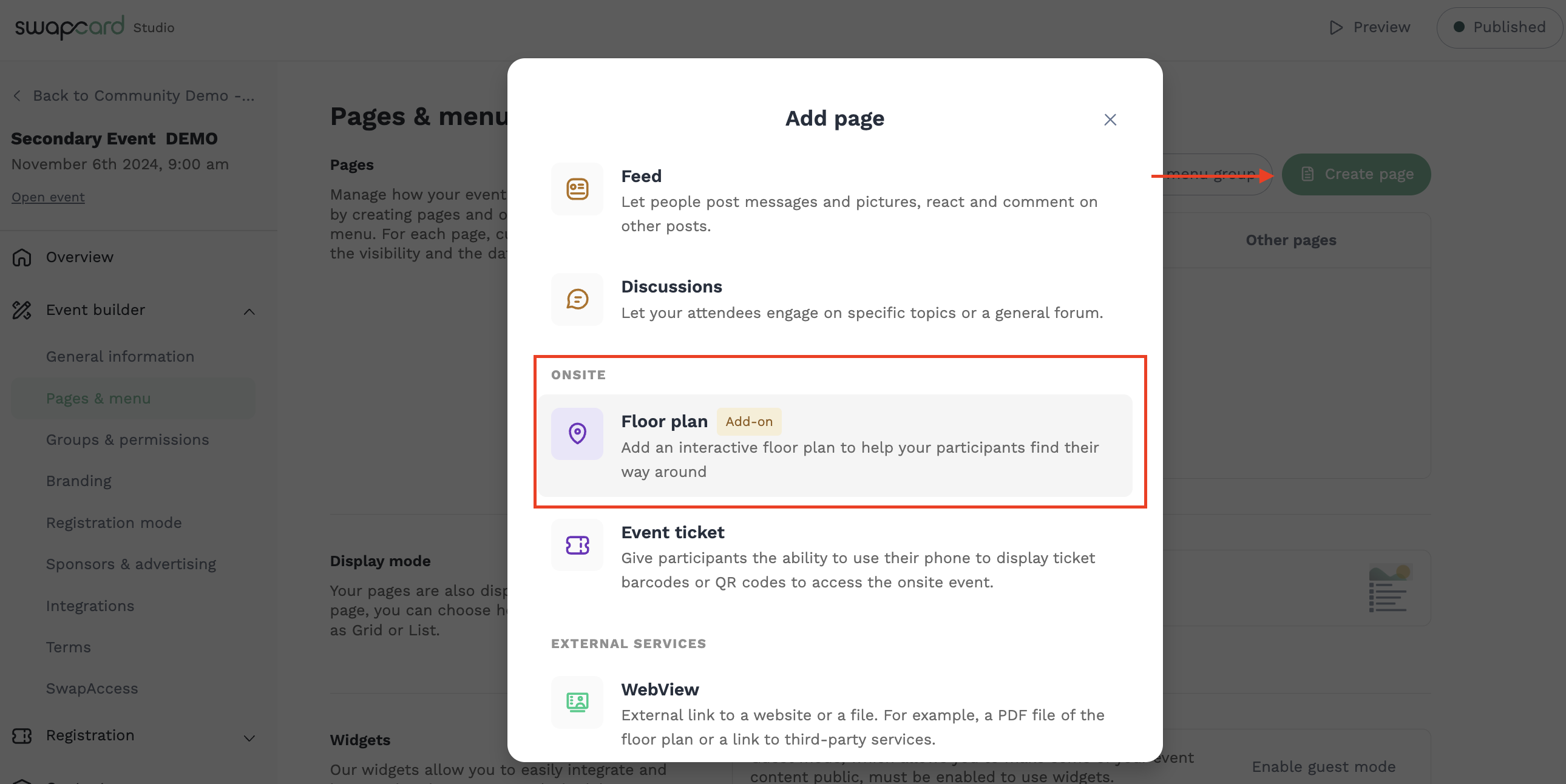
In Swapcard Studio, go to Event Builder → Create Page → Floor Plan and select MapsPeople as your provider. Enter your MapsPeople Venue ID and API Key, set your default zoom level (1–21) and map orientation, and your interactive floor plan is ready.
Step 2: Link sessions to map locations
Add a custom single-choice field named exactly "MapsPeople" to your sessions. For each session, populate this field with the Point of Interest (POI) name from the MapsIndoors CMS — names must match exactly (e.g. "24 Tech Stage" in MapsIndoors CMS must be "24 Tech Stage" in Swapcard, not "24 Stage"). You can do this in bulk by exporting your session list, copying location data into the MapsPeople field, and reimporting. Once mapped, the "See on map" button appears automatically on every linked session detail page.
Step 3: Link meeting locations to the map
Create your meeting locations in Swapcard and assign them when creating meetings. Attendees can tap directly to the map from the meeting detail page, or when creating a meeting and selecting a location.
Step 4: Go live and track how attendees move
Publish your floor plan, generate QR codes for onsite placement, and — if Indoor Positioning is enabled — begin capturing heatmap data from day one. Use traffic insights after the event to optimize layout, plan booth placement, and demonstrate venue ROI to exhibitors.
Use Cases & Benefits
Why event organizers choose MapsPeople with Swapcard
Large-venue navigation is one of the most common sources of negative attendee feedback — and one of the easiest to solve when wayfinding is embedded in the event app from the start.
- Reduced operational burden — fewer staff hours spent giving directions; self-service navigation handles the volume
- Higher session attendance — attendees who can find a room actually show up to it
- Stronger exhibitor value proposition — geofencing engagement and proximity notifications are a premium, sellable benefit
- Smarter layout decisions — heatmap data from Indoor Positioning shows exactly where attendees dwell, cluster, and avoid
- Flexible access management — visibility controls mean sensitive areas stay protected without additional infrastructure
- One app, zero friction — every feature lives inside Swapcard; attendees never need to download, switch, or remember a second tool
"Having the floor plan inside our event app was a game changer. Attendees stopped asking staff for directions and started navigating on their own. The 'See on map' button on each session made it feel seamless — like it was always meant to work that way."
— Director of Events, Leading Trade Show Organizer
Frequently asked questions about Mapspeople with Swapcard's integration
What does the MapsPeople integration do?
.svg)
.svg)
It embeds an interactive indoor floor plan directly inside the Swapcard web, iOS, and Android apps. Attendees can navigate the venue and tap "See on map" from any session detail page without leaving the app. When a meeting location is assigned, attendees can also tap to open the map at the correct location. Optional add-ons include live Indoor Positioning and geofencing push notifications for exhibitors.
Do I need a separate MapsPeople account to use this integration?
Yes. MapsPeople and Swapcard are separate platforms. You need an active MapsPeople account with a Venue ID and API Key — both provided by MapsPeople — along with a CAD file (.dwg) of your venue floor plan. Your MapsPeople account is set up directly with MapsPeople. On the Swapcard side, the Interactive Floor Plan add-on must be included in your contract. If it isn't, contact your Swapcard account manager for details on pricing and setup.
What do I need before I can set this up?
Four things: the Interactive Floor Plan add-on included in your Swapcard contract; a CAD file (.dwg) of your venue floor plan; your MapsPeople Venue ID; and your API Key — both provided by MapsPeople. If you want Indoor Positioning, that is a separate add-on requiring its own setup with Crowd Connected or IndoorAtlas.
How does Indoor Positioning work, and do I need it?
Indoor Positioning is an optional add-on that shows a live location indicator on the floor plan via Crowd Connected or IndoorAtlas. It also unlocks heatmap data showing how attendees move through the venue and enables geofencing push notifications for exhibitors. It is not required to run the integration — the interactive floor plan and session-to-map linking work without it.
Can I restrict the floor plan to specific attendee groups?
Yes. Organizers can control which attendee groups have access to the floor plan page inside Swapcard. VIP-only zones, restricted areas, or back-of-house sections can be hidden from general attendees without any additional access control infrastructure.

Easily integrate & unify your data
Seamlessly connect your essential event tools and unlock the power of unified data to make data-driven decisions that enhance event success and foster long-term growth.

“Swapcard helped us with the integration of data across our different business units...has helped my team save 2 weeks of work per event.”

Patrick Shields
Director of Customer Success, Informa Tech
Schedule live demo
By submitting this form, you agree to receive periodic emails on insightful content related to events and our product, and in accordance with our Privacy Policy. You can, of course, change your preferences or unsubscribe at any time.


.svg)

.svg)
