
Session, speaker & exhibitor data sync made simple
Swapcard + ASP Events Integration
Connect ASP Events to Swapcard to reduce manual uploads and keep event content aligned across systems. This integration helps teams move faster from source data to an attendee-ready experience without rebuilding sessions, speakers, and exhibitors in multiple tools.


Why Integrate Swapcard with ASP Events?
Swapcard helps event organizers create stronger event experiences through networking, exhibitor visibility, content discovery, lead capture, and analytics. ASP Events manages operational event data, including sessions, speakers, and exhibitor contacts. When integrated, the two platforms create a more connected workflow by importing key ASP Events streams into Swapcard, so your agenda and exhibitor directory stay consistent and ready for activation.
- Reduce manual imports – Bring sessions, speakers, and exhibitor contacts into Swapcard without repeated spreadsheet uploads.
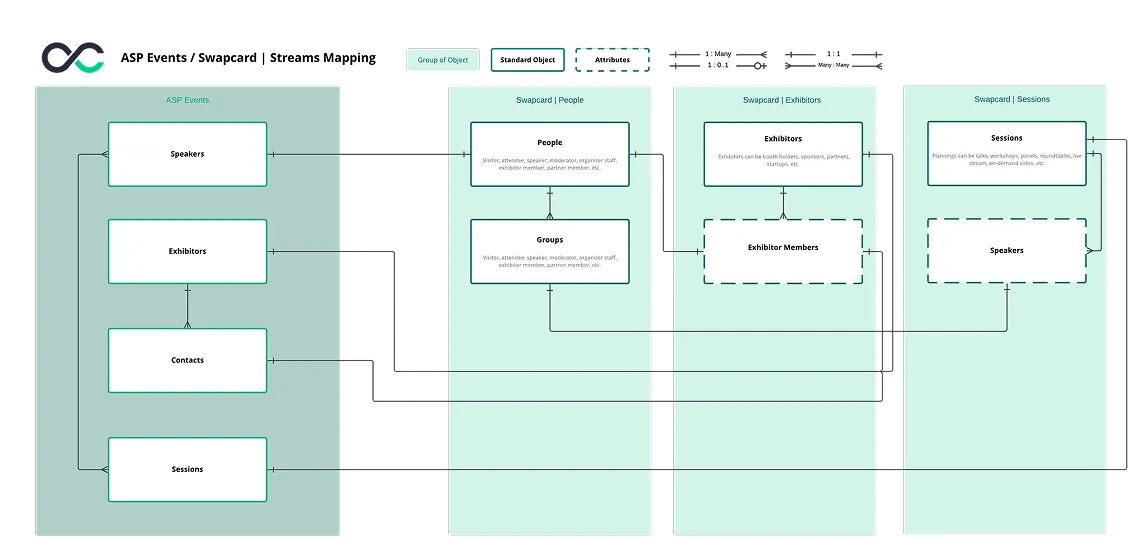
- Preserve content relationships – Maintain links between sessions, speakers, and exhibitors across both platforms.
- Keep exhibitor data aligned – Reflect updates to exhibitor stand names from ASP Events in Swapcard without creating duplicate records.
- Prepare content and exhibitor experiences faster – Activate agendas, speaker profiles, and exhibitor visibility using synced data from ASP Events.
- Improve operational efficiency – Reduce duplicate setup work by centralizing engagement in Swapcard during import from ASP Events.
What the Integration Enables
- Automated content sync – Import sessions, speakers, exhibitors, and booth data from ASP Events into Swapcard, so your event content and exhibitor information are ready for activation.
- Structured data relationships – Maintain the connections between speakers and sessions, as well as between exhibitors and their contacts, for a more organized event experience.
- Exhibitor and booth data alignment – Sync exhibitor details, including booth information, and keep stand data aligned across systems.
- Consistent updates across platforms – Changes made in ASP Events, such as stand name updates, are reflected in Swapcard without creating duplicate records.
- Cleaner event setup – Reduce manual uploads, repetitive admin work, and data inconsistencies by centralizing structured event data in Swapcard.
How It Works
- Request API access from ASP Events. Your ASP Events team provides API credentials (API key and password) required to connect Swapcard to your ASP Events data source.
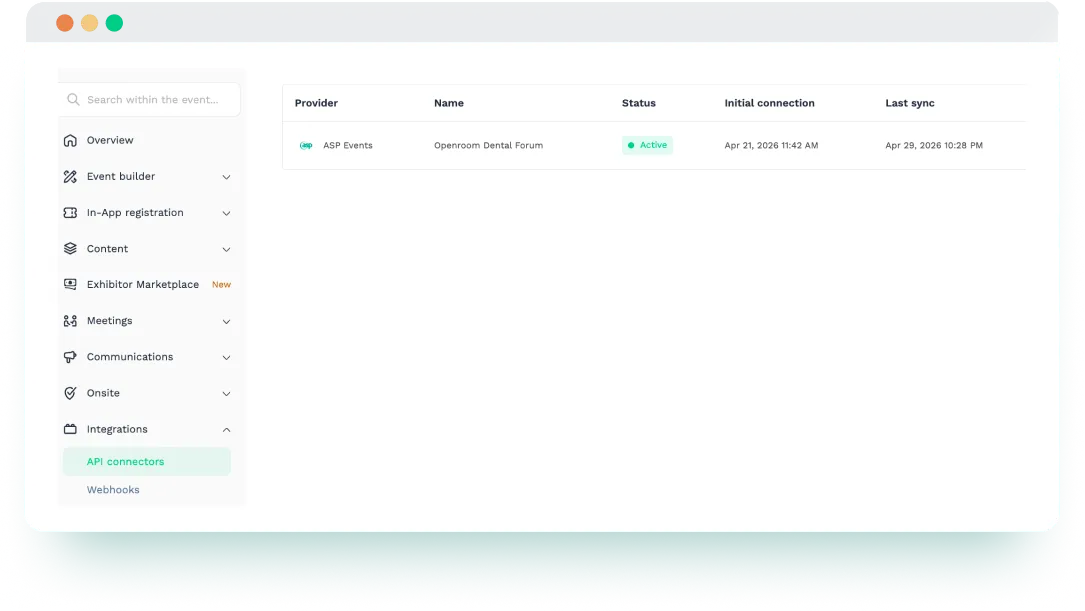
- Connect ASP Events to Swapcard. In Swapcard Studio, go to Event Builder → Integrations, select ‘’ASP Events’’ and enter your credentials.
- Authenticate with your ASP Events credentials. The integration requires two credentials supplied by ASP Events: an API Key and a Password.
- Select the ASP Events event to connect. The integration displays all events your account has access to. Choose the ASP Events event you want to sync with your Swapcard event.
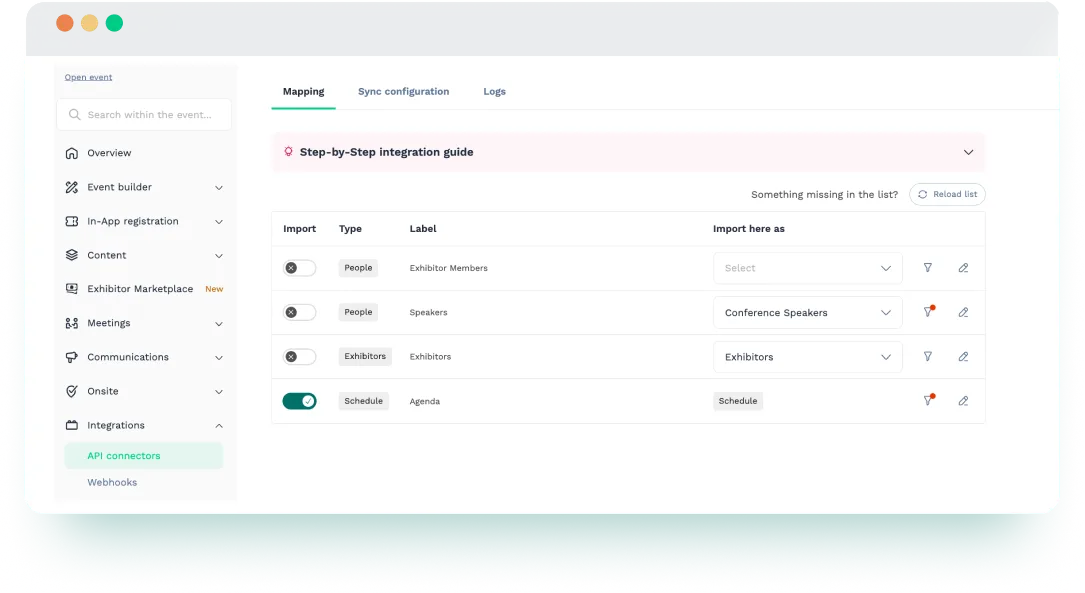
- Map your data. Define how ASP Events data (sessions, speakers, exhibitors) maps to Swapcard entities.
- Start the synchronization manually. Sync begins only after you manually launch the integration and complete the required mapping.
- Maintain your content in ASP Events. Continue managing event content in ASP Events while Swapcard reflects those updates.
Use Cases & Benefits
Why Event Organizers Love ASP Events Integration with Swapcard
- Less manual setup – Import core event data directly instead of rebuilding exhibitor, speaker, and session records manually.
- More structured event data – Relationships between related records are recreated automatically where supported.
- Cleaner booth updates – Stand name changes are updated in place instead of creating a new record.
- Better agenda and profile readiness – Sessions and speakers can be added to Swapcard more quickly, helping teams prepare the content experience more efficiently.
- Clear operational guardrails – The documentation is transparent about limitations such as deletion handling and sync constraints, helping teams plan accordingly.
- A smoother path from source data to event engagement – ASP Events provides the operational data, while Swapcard helps transform that data into a more interactive event experience.
Frequently asked questions about the ASP Events and Swapcard integration
What does the integration between ASP Events and Swapcard manage?
.svg)
.svg)
ASP Events helps organizers manage operational event data, including sessions, speakers, exhibitors, exhibitor contacts, and booth information. Swapcard is a revenue-first event management platform built for registration, attendee engagement, session and speaker management, exhibitor management, lead capture, and analytics. This integration imports core event data from ASP Events into Swapcard, so organizers can reduce manual setup, preserve structured relationships between records, and make event content and exhibitor information ready for activation across the Swapcard experience.
Do I need an ASP Events account?
Yes. You need access to ASP Events and API credentials provided by your ASP team to configure the integration.
What data can be imported from ASP Events to Swapcard?
The integration supports four main streams from ASP Events: Speakers, Exhibitors, Exhibitors → Contacts, and Sessions, all of which are imported into Swapcard. Speakers can include name, email, title, company, description, photo, and speaker type; exhibitors can include name, description, logo, website, booth, email, and social links; sessions can include title, dates, description, location, abstract, code, and categories.
How are records matched and relationships maintained between ASP Events and Swapcard?
The integration uses unique identifiers (UUID fields) to match records accurately between ASP Events and Swapcard, helping preserve important relationships between entities, such as speakers linked to sessions and exhibitor contacts linked to their exhibitor companies.
Are relationships and deletions handled automatically?
Partially. The integration preserves key relationships between records, such as speakers linked to sessions and exhibitor contacts linked to exhibitors. However, automatic deletion handling is limited: only session deletions are captured automatically, while other deleted records, such as exhibitors or deleted exhibitor stands, must be removed manually in Swapcard.

Easily integrate & unify your data
Seamlessly connect your essential event tools and unlock the power of unified data to make data-driven decisions that enhance event success and foster long-term growth.

“Swapcard helped us with the integration of data across our different business units...has helped my team save 2 weeks of work per event.”

Patrick Shields
Director of Customer Success, Informa Tech
Schedule live demo
By submitting this form, you agree to receive periodic emails on insightful content related to events and our product, and in accordance with our Privacy Policy. You can, of course, change your preferences or unsubscribe at any time.


.svg)

.svg)
