
Consistent session & speaker management
Swapcard + Cadmium Integration
Automatically import approved sessions and speaker data from Cadmium into Swapcard to streamline agenda building and speaker management, ensuring your content remains consistent across the web and mobile app for an engaging attendee experience.


Why Integrate Swapcard with Cadmium?
Swapcard is a comprehensive event platform for engagement, content delivery, networking, and analytics. Cadmium is a trusted system for session submission, review, and speaker workflows. When integrated, they create a seamless connection between back-end content management and front-end attendee experience, helping organizers:
- Manage session content from start to sync. Use Cadmium to collect abstracts, review submissions, finalize sessions, and manage speaker data; then sync approved content directly into Swapcard.
- Automate agenda building. Import sessions, rooms, time slots, and speaker info directly from Cadmium into Swapcard without manual input.
- Keep data synchronized. Pull updated session content or speaker changes from Cadmium into Swapcard at any time with manual syncs.
- Reduce manual work. Eliminate spreadsheets and copy-paste by syncing session and speaker data automatically.
- Accelerate setup. Speaker and session content appear instantly in Swapcard for agenda publishing, app configuration, and audience access.
- Ensure content consistency. Centralize session and speaker data to keep titles, descriptions, schedules, and profiles aligned across Cadmium and Swapcard.
- Enhance the attendee experience. Deliver accurate, real-time agenda content in the Swapcard app, powering search, filters, bookmarks, and engagement features.
What the Integration Enables
- Session data import – Automatically pull approved session titles, descriptions, times, and locations from Cadmium into Swapcard.
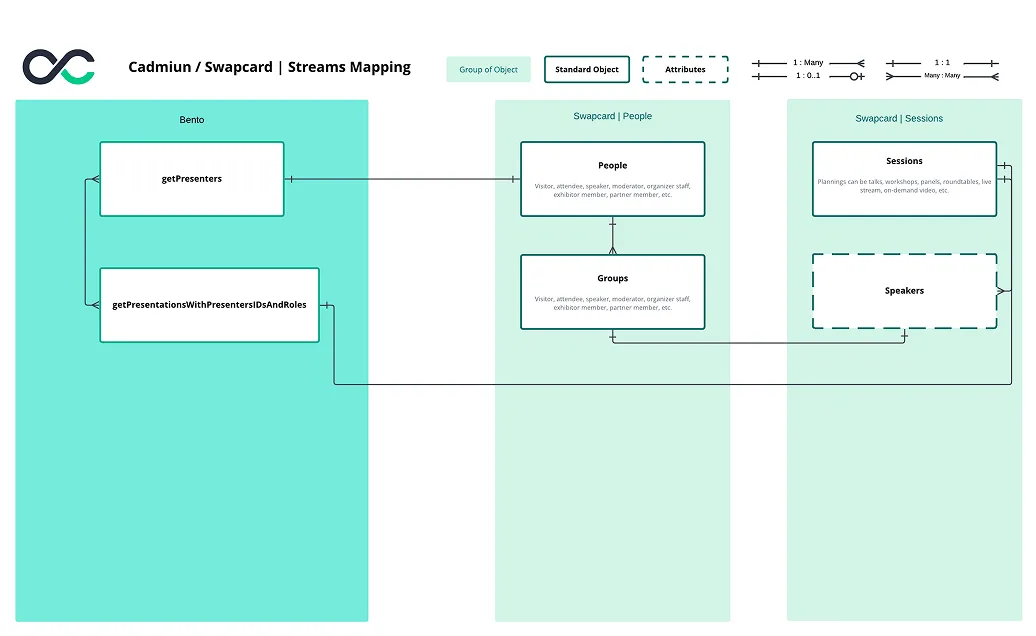
- Speaker profile sync – Import and link speaker data, including names, bios, photos, titles, affiliations, and headshots, to create complete and accurate profiles.
- Linked session-speaker records – Maintain relationships between sessions and their assigned speakers inside Swapcard.
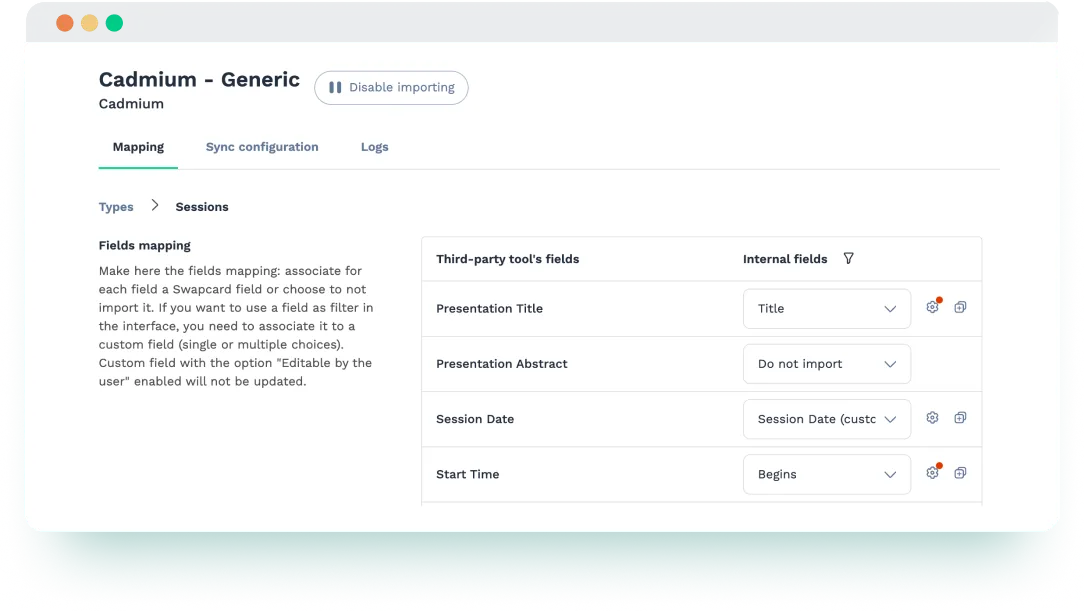
- Field mapping customization – Map session and speaker fields from Cadmium to Swapcard based on your event’s structure and display preferences.
- Manual sync control – Trigger updates from Cadmium to Swapcard anytime to reflect approved changes.
- Controlled publishing – Choose when to sync and publish content into the Swapcard agenda.
How It Works
- Prepare your Cadmium credentials. Ensure you have access to your Cadmium account, including Event ID, username, password, install name, and API key.
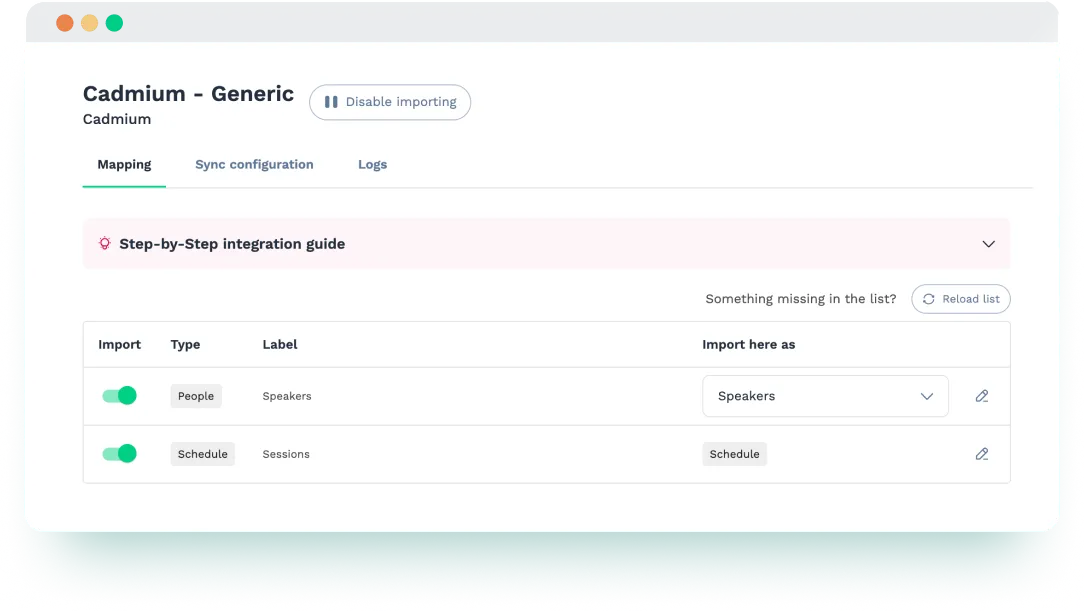
- Connect Cadmium to Swapcard. In Swapcard Studio, go to Event Builder → Integrations, select ‘’Cadmium’’, and link it to your Swapcard event.
- Map and sync content. Choose which session and speaker fields to import from Cadmium, and map them to corresponding fields in Swapcard.
- Publish your agenda. Once the sync is complete, approved sessions and speaker profiles will appear in your Swapcard agenda.
- Keep your content updated. The integration supports both manual and automatic syncs. Changes made in Cadmium are automatically synced every hour into Swapcard, or you can trigger a manual sync at any time to update your event instantly.
Use Cases & Benefits
Why Event Organizers Love Cadmium Integration with Swapcard
- Faster agenda setup – Automatically populate Swapcard with sessions and speakers.
- Cleaner data – Reduce manual errors with structured, consistent imports.
- Speaker consistency – Match Cadmium speaker data to Swapcard profiles, keeping speaker info clean and centralized.
- Aligned schedules – Keep your agenda current by syncing updates from Cadmium to Swapcard in just a few clicks.
- Simplified workflows – Manage session and speaker content in Cadmium and reflect updates instantly in Swapcard.
Frequently asked questions about the Cadmium and Swapcard integration
What does the integration between Cadmium and Swapcard manage?
.svg)
.svg)
Cadmium is a platform for call-for-papers, session planning, and speaker management. Swapcard is an event platform that powers engagement, agenda delivery, and analytics. This integration imports session titles, descriptions, times, rooms, and speaker details—including linked relationships—from Cadmium into Swapcard, ensuring your event app reflects accurate, up-to-date content.
Do I need a separate Cadmium account to use this integration?
Yes. You must have an active Cadmium account and valid event credentials to connect it with Swapcard.
Can I sync updates after the first import?
Yes. You can run manual or automatic syncs at any time from Swapcard Studio. New or updated session and speaker data in Cadmium will reflect in Swapcard. However, deletions in Cadmium must be removed manually from Swapcard.
Does the integration create speaker profiles in Swapcard?
Yes. Speaker data from Cadmium is imported and can be matched with existing profiles or used to create new ones in Swapcard.
Can I control which fields are imported?
Yes. You can map session and speaker fields from Cadmium to corresponding fields in Swapcard, allowing you to customize what data is synced and how it’s displayed.

Easily integrate & unify your data
Seamlessly connect your essential event tools and unlock the power of unified data to make data-driven decisions that enhance event success and foster long-term growth.

“Swapcard helped us with the integration of data across our different business units...has helped my team save 2 weeks of work per event.”

Patrick Shields
Director of Customer Success, Informa Tech
Schedule live demo
By submitting this form, you agree to receive periodic emails on insightful content related to events and our product, and in accordance with our Privacy Policy. You can, of course, change your preferences or unsubscribe at any time.

.svg)


.svg)
.svg)
.svg)
.svg)


