
Real-time attendee sync for smoother event operations
Swapcard + Eventbrite Integration
Sync Eventbrite registrations directly with your Swapcard event platform to manage check-in, networking, and engagement in one unified platform. Automatically import attendee data, eliminate manual uploads, and keep your registration and event experience aligned in real time.
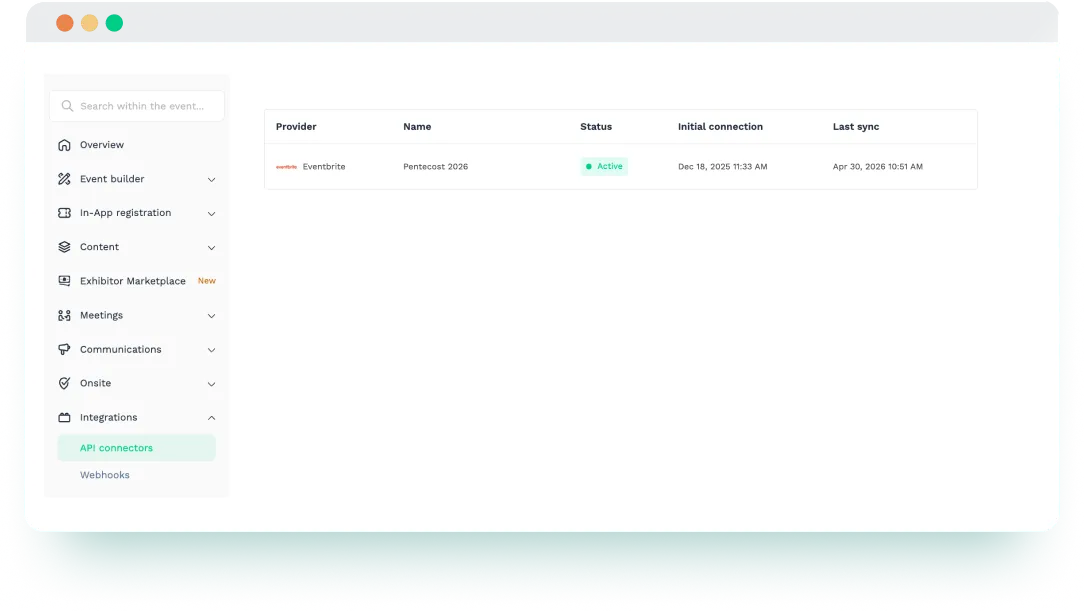


Why Integrate Swapcard with Eventbrite?
Swapcard powers the event experience across web and mobile, including networking, session engagement, lead capture, exhibitor ROI, and analytics. Eventbrite is widely used for event registration and ticketing. When integrated, the two platforms help you create a more connected workflow from registration to event participation, without relying on repeated CSV imports.
Swapcard helps event organizers deliver engaging event experiences with attendee networking, exhibitor ROI tools, content management, and analytics.
- Reduce manual attendee imports. Bring attendee data from Eventbrite into Swapcard without relying on spreadsheets or repeated file uploads.
- Real-time registration updates. Keep attendee lists up to date as registrations change in Eventbrite.
- Start engagement sooner. Sync registered attendees into Swapcard so they are ready for networking, agenda access, mobile app use, and onsite experiences earlier.
- Improve operational efficiency. Minimize duplicate entries across systems and keep your event team working from one accurate attendee list
- Support a better attendee experience. Accurate attendee data in Swapcard makes it easier to prepare the event experience around the right participants.
- Ticket-based segmentation. Use Eventbrite ticket types to segment attendees inside Swapcard.
.webp)
What the Integration Enables
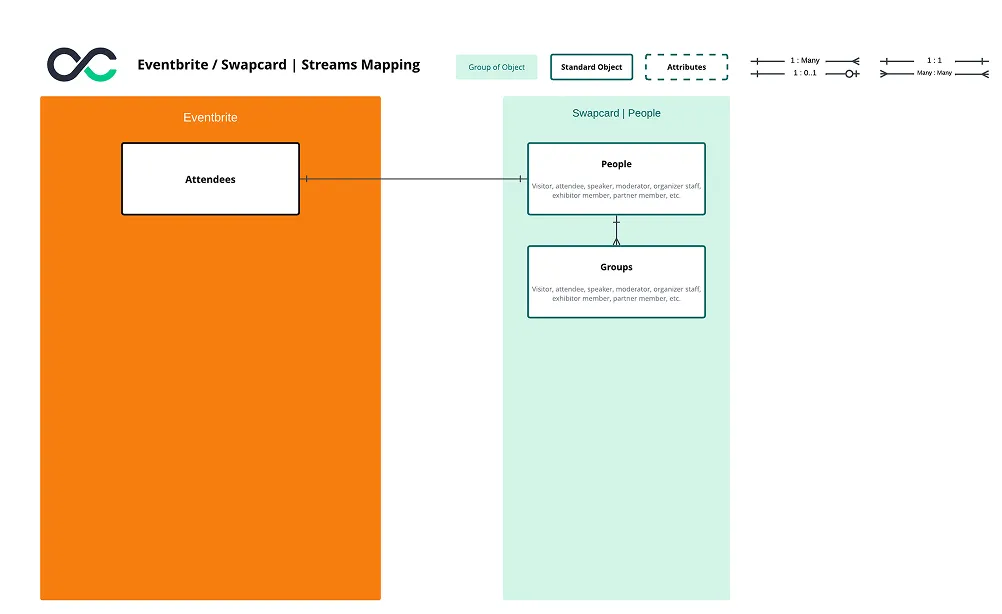
- Duplicate control via email logic – Email is used as the unique identifier. If multiple records share the same email, Swapcard keeps the record linked to the most recent ticket.
- Attendee eligibility filtering – Only attendees with the status Attending are imported from Eventbrite to ensure the data is relevant.
- Streamlined check-in and engagement – Automatically import attendees into Swapcard as they register in Eventbrite, keeping your attendee list ready for badge scanning, session access, and networking.
- Structured attendee data import – Import buyer and attendee data, such as name, email, status, and address, into Swapcard.
- Flexible sync options – Use full refresh, incremental sync, or webhook support depending on your event setup and data needs.
How It Works
- Connect Eventbrite to Swapcard. In Swapcard Studio → Event Builder → Integrations, select ‘’Eventbrite’’ and authenticate your account.
- Authenticate your account. Use the Eventbrite access token required to activate the integration.
- Select the right Eventbrite event. The integration displays the events your Eventbrite account can access, including upcoming and past events. Choose the event you want to sync with Swapcard.
- Map attendee data. Define how Eventbrite registration fields map to Swapcard attendee profiles. Use email as the unique identifier to match attendee records and avoid duplicates.
- Run your sync. Import attendees from Eventbrite into Swapcard. Initial sync imports all registered attendees. Future updates sync new or modified registrations.
- Keep attendee records updated. With supported sync modes including full refresh, incremental sync, and webhook, your attendee data can stay aligned as registrations change.
Use Cases & Benefits
Why Organizers Love Eventbrite Integration with Swapcard
- Faster event setup – Build your attendee list in Swapcard automatically from Eventbrite registrations.
- More reliable attendee records – Supported sync modes help keep data aligned as registrations update.
- Cleaner data management – Email-based uniqueness rules help avoid duplicate attendee records.
- Better visibility into edge cases – Organizers can account for limitations, such as deleted attendee records not syncing automatically.
- A smoother transition from registration to engagement – Eventbrite supports registration, while Swapcard helps deliver the event experience once attendee data is in place.
Frequently asked questions about the Eventbrite and Swapcard integration
What does the integration between Eventbrite and Swapcard manage?
.svg)
.svg)
Eventbrite manages registration and ticketing. Swapcard powers the event experience across web and mobile, including networking, content & session management, lead capture, exhibitor ROI, and analytics. This integration imports attendee registration data from Eventbrite into Swapcard, keeping your attendee list accurate and ready for check-in, networking, and engagement.
Is the Eventbrite integration native to Swapcard?
Yes. Eventbrite is available as a connector in Swapcard Studio under Event Builder → Integrations. To use it, you need an active Eventbrite account with access to the event you want to connect, then authenticate with an Eventbrite access token and configure the sync.
Does the integration support real-time updates?
Yes. After the initial import, new registrations and Eventbrite registration updates can be synced into Swapcard. The integration supports full refresh, incremental sync, and webhook updates.
What attendee data can be imported from Eventbrite into Swapcard?
The integration can import attendee and buyer-related fields, including first name, last name, email, buyer status, and address-related fields.
How are attendees matched, and how are duplicate emails handled?
Attendees are matched using email as the unique identifier to maintain consistent records and reduce duplicates. If multiple Eventbrite records share the same email, Swapcard retains the record linked to the most recent ticket.

Easily integrate & unify your data
Seamlessly connect your essential event tools and unlock the power of unified data to make data-driven decisions that enhance event success and foster long-term growth.

“Swapcard helped us with the integration of data across our different business units...has helped my team save 2 weeks of work per event.”

Patrick Shields
Director of Customer Success, Informa Tech
Schedule live demo
By submitting this form, you agree to receive periodic emails on insightful content related to events and our product, and in accordance with our Privacy Policy. You can, of course, change your preferences or unsubscribe at any time.


.svg)

.svg)
